
Credential
Mobile pass, wallet credential, secure card, fob, PIN, QR code or another approved identity method.
Commercial access control • Northwest Florida
Cybersmetrics designs, installs, modernizes and troubleshoots door, gate, elevator, intercom and credential systems for condominiums, HOAs, resorts, businesses and controlled facilities across Northwest Florida.
The direct answer
The best system is the one that remains secure, manageable and supportable after the installer leaves. UniFi Access can be a strong modern option for properties invested in the UniFi ecosystem. Brivo and Avigilon Alta emphasize cloud management. Axis favors open IP and edge architecture. HID provides a widely used reader and credential ecosystem. Paxton offers approachable options for many small and midsize sites.
No platform wins every project. The correct choice depends on opening hardware, credentials, gates, elevators, visitor volume, offline operation, integrations, cybersecurity, recurring cost and the people who must administer it every day.
Access control explained
A reliable controlled opening coordinates identification, a decision, physical locking, door monitoring, safe egress, power and an auditable event record.
Mobile pass, wallet credential, secure card, fob, PIN, QR code or another approved identity method.
Captures the credential and communicates with the controller using a supported, preferably supervised protocol.
Applies schedules and permissions locally or through a managed platform and records the event.
Electric strike, electrified lock, maglock or gate interface selected for the opening and required behavior.
Door contact, request-to-exit, forced-door and held-door conditions reveal what physically happened.
Administrators issue, revoke, audit and review access without creating unsafe shortcuts or unmanaged exceptions.
Hardware selection by opening
The reader identifies a credential, but the controller, lock, monitoring, egress hardware, power and door condition determine whether the complete opening is secure and dependable.
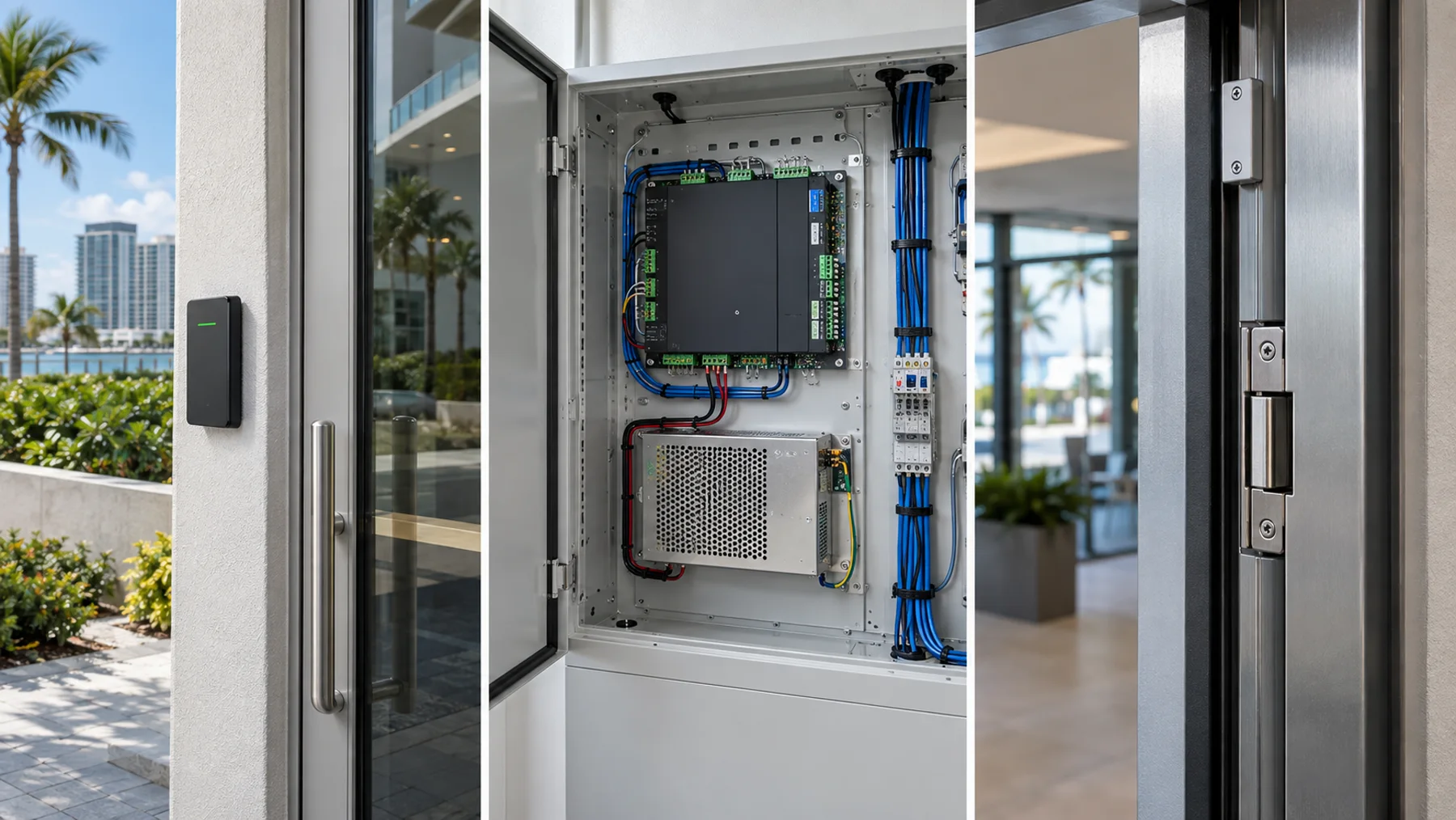
Commonly used atExterior doors, lobbies, offices, amenities and gates
Design checkChoose weather rating, credential technology, OSDP support, mounting surface and accessible reach.
Commonly used atSecure telecom room or protected enclosure near one or more openings
Design checkVerify offline operation, input/output capacity, network design, enclosure tamper and future expansion.
Commonly used atMany latch-based metal or wood commercial doors
Design checkConfirm frame condition, latch geometry, fire rating, fail-secure/fail-safe requirement and code-compliant egress.
Commonly used atHigher-use openings where the locking function belongs in the hardware
Design checkCoordinate door preparation, hinge-side power transfer, lever operation, fire listing and serviceability.
Commonly used atSelected glass, aluminum or specialty openings when permitted by the complete life-safety design
Design checkRequires careful release, fire-interface, sensor, egress and code coordination; it is not the default for every door.
Commonly used atControlled doors that must report closed, forced-open, held-open and exit activity
Design checkPlace and supervise devices so the event record describes what physically happened—not only what the controller commanded.
Commonly used atProtected interior location serving locks and controllers
Design checkSize for normal and alarm load, voltage drop, desired runtime, fire interface, monitoring and documented replacement intervals.
Commonly used atVehicle entrances and approved floor-control applications
Design checkUse defined dry contacts or supported integrations, preserve safety and fire-service behavior and document responsibility boundaries.
Modern platforms we evaluate
Cybersmetrics is not locked to one manufacturer. We compare architecture, operating fit and lifecycle cost. Product capabilities change; final specifications are confirmed against current manufacturer documentation before procurement.
Often a fit for: Technology-forward businesses, offices, condominiums and properties already using UniFi networking or Protect video
Design check: Best results come from treating switching, PoE capacity, console redundancy, door hardware and emergency operation as one design—not simply adding a reader to a network.
Review official platform information ↗Often a fit for: Commercial real estate, multifamily properties and organizations managing multiple locations
Design check: Subscription structure, credential licensing, internet resiliency, controller capacity and integration scope should be priced over the expected system lifecycle.
Review official platform information ↗Often a fit for: Properties that value open IP architecture and close coordination between access control, video and network infrastructure
Design check: The management platform, controller model, reader technology and video integration must be selected together; Axis hardware can participate in several architectures.
Review official platform information ↗Often a fit for: Organizations seeking mobile-first, cloud-managed access with remote administration
Design check: Confirm recurring costs, offline behavior, credential experience, video integration and whether existing readers, locks and cabling can be retained.
Review official platform information ↗Often a fit for: Upgrades that need flexible, enterprise-recognized readers and a controlled migration from older credential technologies
Design check: HID is often the credential and reader layer—not the complete head-end platform. The controller, software, credential security and key-management plan still matter.
Review official platform information ↗Often a fit for: Small and midsize commercial sites seeking straightforward administration, door entry and mobile management
Design check: Choose between Net2 and Paxton10 based on current infrastructure, video needs, remote-management expectations and long-term product fit—not name familiarity alone.
Review official platform information ↗Brand-independence statement: Mention of a manufacturer does not imply endorsement, certification, partnership or suitability for every property. Cybersmetrics recommends equipment only after evaluating the project requirements.
Cloud, local or hybrid?
The architecture affects recurring cost, remote administration, outage behavior, data governance, integrations and who is responsible for maintaining the platform.
| Decision factor | Cloud-managed | Locally managed / on-premise | What to verify |
|---|---|---|---|
| Administration | Usually strong remote and multi-site access | Greater local control; remote access requires deliberate design | Roles, MFA, audit logs and offboarding |
| Internet outage | Local controllers may continue decisions; cloud features can be limited | Local operation can continue if server, network and power remain healthy | Document and test exact offline behavior |
| Cost model | Commonly includes recurring subscriptions or credentials | More infrastructure and maintenance may remain on-site | Compare a 5–10 year ownership range |
| Updates | Vendor-managed services can simplify platform updates | Property or service provider owns more maintenance | Patch responsibility and support lifecycle |
| Integrations | APIs and packaged integrations may be available | Can offer deep local integration when supported | Verify the exact event and workflow |
| Resilience | Depends on controllers, WAN, cloud service and backup power | Depends on server, controller, LAN and backup power | No architecture replaces a continuity plan |
Credentials are changing
Modern systems can support phones, watches, encrypted smart cards, fobs, PINs, QR visitor passes, biometrics and—in specialized vehicle workflows—license plates. Convenience must be balanced with user inclusion, privacy, support burden and revocation control.
Fast issuance and remote revocation, with a user experience that depends on device compatibility and enrollment.
A dependable physical option when modern encryption and credential-key management are correctly implemented.
Time-limited mobile, PIN or QR permissions can improve guest and vendor accountability when policy matches technology.
Higher-risk openings may require two approved factors, but the workflow must remain practical and code-compliant.
Designed for real openings
Lock compatibility, frame condition, door closer, REX, contact, fire interface, power and a clean pathway.
Operator interface, loop and photo-eye safety, intercom, credential reach, vehicle stacking and manual operation.
Approved floor-control interfaces, fire-service behavior, resident and vendor permissions, and service access.
Resident convenience, scheduled access, door-held monitoring and hardware suited to humidity and corrosive exposure.
Intercom directories, video verification, remote release, delivery workflows and temporary permissions that expire.
Fiber or properly engineered links, segmented networks, distributed controllers, UPS coverage and maintainable enclosures.
Telephone entry, intercoms and verification video
Telephone entry answers “who should be called?” A video intercom helps answer “who is actually there?” Cameras preserve context and evidence, but they should not be expected to replace a controlled release decision.
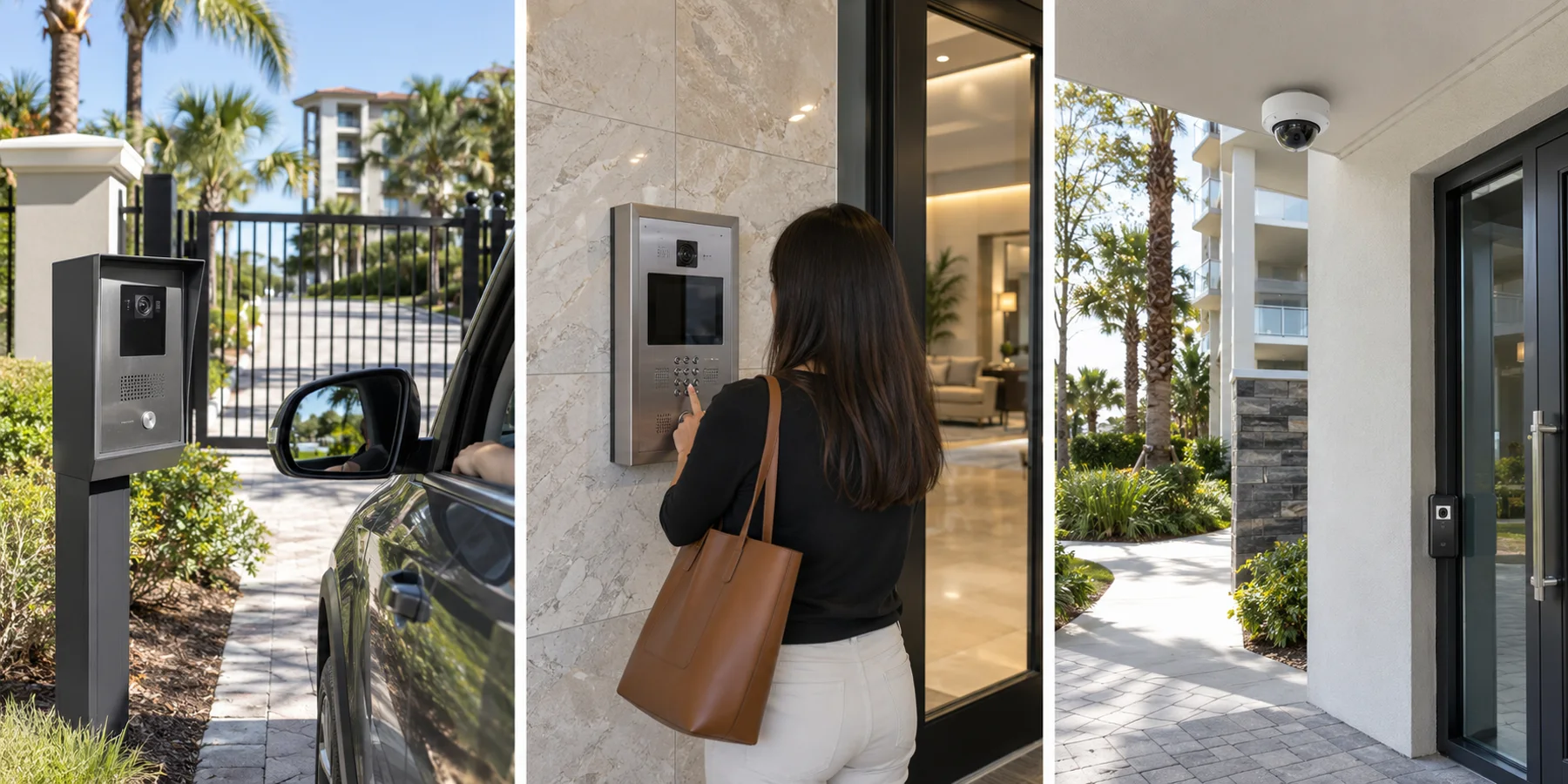
Best used forCondominium lobbies, multi-tenant buildings and vehicle gates where visitors call a resident, tenant or staffed desk.
VerifyDirectory privacy, call routing, cellular or network dependency, remote release, turnover updates and outage procedure.
Best used forEntrances where the person granting access needs live audio and visual verification.
VerifyCamera height, night lighting, audio quality, glare, accessibility, mobile answering, recording policy and release accountability.
Best used forLow-risk temporary, staff or vendor workflows when individual codes can expire and be audited.
VerifyAvoid permanent shared codes. Define issue, expiration, reuse, failed attempts and emergency change procedure.
Best used forManaged guest, rental, delivery or event access that benefits from time limits and remote issuance.
VerifyReader location, phone-free fallback, connectivity, screenshot sharing, revocation, privacy and gate compatibility.
Best used forCaptures the person, vehicle, door or gate movement and surrounding event context.
VerifyDo not aim only at the reader. Verify face or vehicle context, backlight, night performance, retention and event timestamps.
Best used forDedicated face-height or plate-capture view when reliable identification is a stated objective.
VerifyUse application-specific angle, distance, shutter, lighting and scene design; an ordinary overview camera is not automatically an LPR camera.
Northwest Florida conditions
Salt air, wind-driven rain, lightning, generator transfers, heat, humidity, seasonal occupancy and long high-rise pathways expose weak design quickly. Exterior readers, gate equipment, enclosures, power supplies, network links and surge protection must be selected as one resilient system.
Document lock state, battery runtime, generator coverage and recovery after an extended outage.
Coordinate power, grounding, bonding, data-line protection and electrically isolated links where appropriate.
Use suitable outdoor hardware, sealed pathways and service practices; inspect exposed equipment before failure.
Plan hurricane access, emergency credentials, contractors, first responders and manual overrides before the event.
Before approving a proposal
Legacy migration
A live condominium, resort or business cannot simply shut down every credential and hope the new database is correct.
Document every opening, user group, schedule, credential, relay, input and integration.
Verify locks, readers, power, cabling, contacts and exit devices instead of inheriting unknown failures.
Convert representative openings and validate normal, denied, offline, alarm and emergency behavior.
Phase the migration with communications, temporary access, support coverage and documented rollback.
Deliver administrator training, credential policy, opening schedules, labels, backups and acceptance records.
Local access control service
Local field experience matters when gates, high-rises, coastal conditions and occupied properties shape the installation.
Free access-control buyer's guide
Review architecture, credentials, reader security, door hardware, integrations and recurring costs.
Direct access-control answers
Useful answers for property managers, condominium boards, business owners and facility stakeholders planning a modern system.
There is no universal best brand. A condominium or HOA should select a platform based on the number and type of openings, resident turnover, guest workflow, gates, elevators, intercoms, mobile-credential expectations, internet reliability, management workload and long-term operating cost. Cybersmetrics compares those requirements before recommending a platform.
Cybersmetrics evaluates and deploys modern access-control architectures, including UniFi Access where it fits the property. The final design depends on the controlled openings, locking hardware, life-safety requirements, network and PoE capacity, console architecture, visitor workflow and required integrations.
Many properly designed systems continue making local access decisions during an internet outage, but remote management, mobile features or cloud synchronization may be limited. Offline behavior differs by platform and must be documented and tested before acceptance.
Sometimes. Readers and credentials must be checked for technology, encryption, wiring protocol, condition and manufacturer support. Locks, request-to-exit devices, door contacts, power supplies and cabling must also be tested. Reusing insecure or failing components can undermine a new controller.
Mobile credentials can simplify issuance and revocation and reduce physical credential handling, but they are not ideal for every resident, employee or emergency workflow. Many properties use a controlled mix of mobile credentials, secure cards or fobs, PINs and temporary visitor credentials.
OSDP is a modern reader-to-controller communication protocol that can provide supervised communication and stronger security capabilities than common legacy Wiegand wiring. A migration may require compatible readers, controllers, cabling and configuration.
Yes, when the gate operator, safety devices, elevator controls, relays, permissions and approved interfaces are engineered together. Access control must never bypass required gate safety, fire-service, emergency egress or elevator requirements.
Yes. A useful integration associates door, credential, intercom or alarm events with relevant video so an operator can verify what occurred. Compatibility and event behavior should be demonstrated rather than assumed from a logo on a brochure.
Cost depends on door condition, lock type, pathways, power, fire-alarm coordination, reader and credential technology, controller architecture, subscriptions, gates, elevators and intercoms. A field survey is required for a defensible budget; a cheap per-door allowance often misses the expensive parts.
A per-door allowance is only a starting point. The real installed cost can include the reader, controller capacity, lock or electrified hardware, door contact, request-to-exit device, power supply, battery, fire-alarm interface, cabling, credential licensing, network work and commissioning. Existing door condition often changes the budget more than the reader.
Often, yes. We can troubleshoot supported controllers, readers, credentials, locking hardware interfaces, door contacts, request-to-exit devices, power, networks and administration. Service depends on access credentials, manufacturer support, licensing, parts and the condition of the existing installation.
Cybersmetrics designs, installs, modernizes and troubleshoots commercial access control for businesses, condominiums, HOAs, resorts and controlled facilities across the Northwest Florida Gulf Coast, including Panama City, Panama City Beach, 30A, Santa Rosa Beach, Miramar Beach and Destin.
The answer depends on lock type, battery capacity, generator coverage, controller architecture and emergency requirements. Coastal properties should document fail-safe and fail-secure behavior, provide appropriate backup power and surge protection, and test recovery after utility or generator events.
Begin with a complete opening schedule, credential inventory, wiring and hardware assessment, database cleanup and cutover plan. Pilot representative doors first, define temporary access and rollback procedures, then migrate in controlled phases with administrator and user communication.
Repair, assess or compare?